5 CDN Showdown Bunny CDN vs Cloudflare for WordPress Speed in 2025


For superior WordPress speed in 2025, Bunny CDN is generally anticipated to offer a slight edge over Cloudflare for raw content delivery. A content delivery network (CDN) is crucial for your website performance. It helps speed up your website significantly, enhancing user experience. A cdn ensures your website content reaches visitors quickly. This fast delivery of content is vital. Look at the impact a cdn has on website load times:
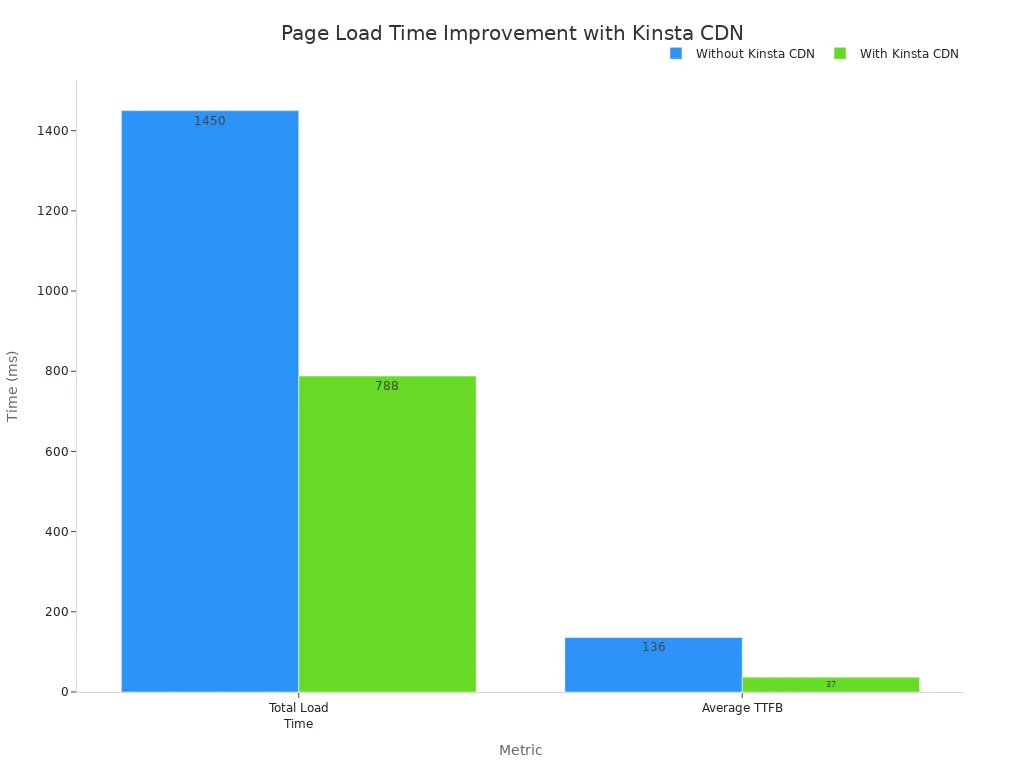
This shows how a cdn can improve website load times by up to 72%. Without a powerful cdn, your website content delivery suffers. We will compare Bunny CDN vs Cloudflare in detail.
Key Takeaways
Bunny CDN often delivers static content faster. It is good for blogs with many images and videos. It has a pay-as-you-go price model.
Cloudflare offers strong security features. It has a wide network of servers. It also has a free plan for basic needs.
Bunny CDN is usually cheaper for small websites. Cloudflare's paid plans cost more. Cloudflare's free plan is a good starting point.
Choose Bunny CDN for raw speed and low cost. Choose Cloudflare for strong security and a free option. Your website's needs help you decide.
Other CDN providers offer special features. They can help with video streaming or large files. Pick a CDN that fits your website best.
1. Bunny CDN
Bunny CDN stands out as a strong alternative to Cloudflare. It offers fast performance, advanced features, and good support. You get these benefits at affordable prices. This content delivery network is especially good for blogs with many images and videos.
Core Features
Bunny CDN provides powerful tools to speed up your website. It includes Bunny Optimizer, which handles image, CSS, and JavaScript optimization. This feature can convert images to WebP format. It also compresses and resizes them for different devices, like phones or desktops. Most content delivery network providers do not offer this built-in optimization.
Here are some key features that boost your website's speed:
On-the-fly image optimization: Images resize based on the user.
Minify CSS and JavaScript: This makes your code smaller.
WebP Support: Delivers modern image formats.
HTTP/2: A faster way to deliver content.
Brotli & GZip: These compress your files.
Instant purging: You can clear cached files quickly.
Bunny CDN also offers easier cache control and faster purge times compared to Cloudflare. You can set how long files stay cached. This helps your website load faster for repeat visitors.
WordPress Performance
Bunny CDN significantly improves your WordPress site's loading times. After its cache warms up, your website content delivers much faster. This means visitors have a smoother experience. You will see reduced server load and quicker content delivery.
You can track specific performance metrics. For example, you can monitor Time to First Byte (TTFB) across different regions. This data helps you find ways to make your website even faster. To check the impact of Bunny CDN, use tools like GTmetrix, WebPageTest, or PageSpeed Insights. These tools show you how much your website's performance improves.
WordPress Integration
Setting up Bunny CDN with WordPress is straightforward. You will need a caching plugin like W3 Total Cache or WP Rocket. Bunny CDN also has its own WordPress plugin. This plugin makes setup easy and fast. It helps you connect your WordPress site to the content delivery network quickly.
Pricing
Bunny CDN offers a flexible pricing model. You only pay for the content you use. This pay-as-you-go system is great for new websites. Its base rates are very competitive.
CDN Provider | Notable Features | |
|---|---|---|
Bunny CDN | $0.005 - $0.02 | Low latency, pay-as-you-go, global PoPs |
Cloudflare | $0.03 - $0.05 | Robust security, free tier options, extensive network |
Amazon CloudFront | $0.04 - $0.08 | Seamless AWS integration, scalable architectures, premium features |
You can see how Bunny CDN compares in price:
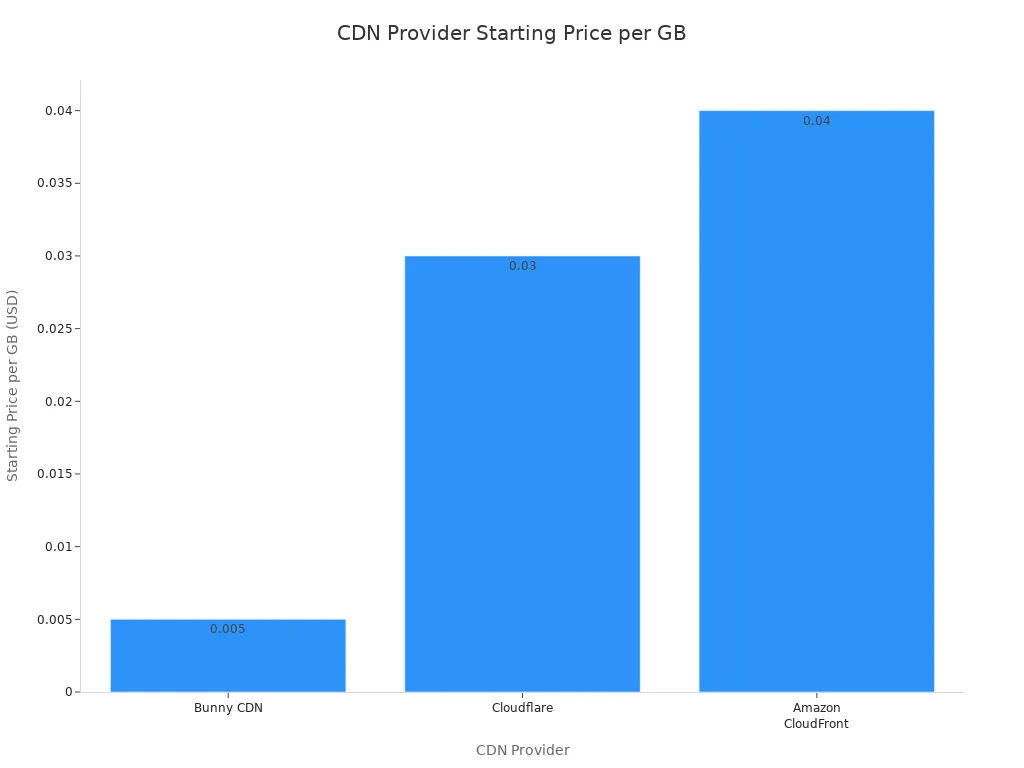
Bunny CDN provides transparent billing. You will not find any hidden fees. This helps you understand your spending clearly.
2. Cloudflare
Cloudflare stands as a leading content delivery network solution. It offers free WordPress CDN services and boasts the widest network of servers globally. For most WordPress sites, Cloudflare is often the easiest choice. However, Cloudflare's free plan may have limitations if you have advanced needs.
Core Features
Cloudflare provides many tools to boost your website's speed and security. You can cache anonymous page views. This means Cloudflare serves static HTML for non-logged-in users, reducing your server's load. It bypasses the cache for dynamic actions like logging in. Cloudflare also optimizes images. Features like 'Polish' compress images and strip metadata, greatly improving page load times.
Here are more key features that enhance your website's performance:
Enable HTTP/2: Your site loads faster with HTTP/2, offering benefits like multiplexing. The Cloudflare WordPress plugin can use HTTP/2 Server Push for CSS and JavaScript.
Minify Assets: Cloudflare can minify your CSS and JavaScript files. This makes them smaller and quicker to download.
Enhanced HTTP/2 Prioritization: This feature optimizes the order your website resources load for maximum speed.
TCP Turbo: It reduces latency by picking optimized TCP settings automatically.
SXGs (Signed Exchanges): This speeds up site loading from Google search results by prefetching content. It improves rendering and Largest Contentful Paint (LCP) on paid plans.
Fast DNS Hosting: Cloudflare offers very fast DNS lookups, which directly impacts initial page load times.
CDN Service: As a content delivery network, Cloudflare hosts parts of your website on servers worldwide. This reduces the distance between visitors and your content, lowering latency.
Automatic Platform Optimization (APO): This paid service caches entire WordPress pages on Cloudflare's edge servers. It leads to much faster loading times and reduces the load on your origin hosting. It also includes image optimization.
Cloudflare also offers robust ddos protection. This protects your website from malicious attacks. You get real-time analytics to monitor your website traffic and content delivery.
WordPress Performance
Cloudflare significantly improves your WordPress site's loading times. Automatic Platform Optimization (APO) can reduce WordPress load times by 70-300%, depending on where you test. Enabling APO can boost overall WordPress performance by up to 300%.
Cloudflare helps with important metrics:
Time to First Byte (TTFB): APO eliminates the 'Reduce initial server response time' warning in PageSpeed Insights. It achieves a low and consistent TTFB by caching your entire website at the edge.
Cache Hit Ratio: APO greatly increases the cache hit ratio. This means more requests are served from Cloudflare's edge servers, improving speed.
However, some features can have downsides. Rocket Loader and Email Address Obfuscation can add JavaScript files. These files may contribute to warnings like 'Avoid long main-thread tasks'. They can negatively impact Total Blocking Time (TBT) and Largest Contentful Paint (LCP).
WordPress Integration
Integrating Cloudflare with your WordPress website is straightforward. You typically change your domain's nameservers to Cloudflare's. This routes all your website traffic through their network. Cloudflare then handles content delivery, ddos protection, and other services. You can also install the official Cloudflare WordPress plugin. This plugin helps you manage settings directly from your WordPress dashboard. It also enables specific features like APO for better optimization of your dynamic content.
Pricing
Cloudflare offers various pricing tiers to suit different needs. You can start with a free plan. This plan provides basic performance and ddos protection.
Here is a breakdown of Cloudflare's plans:
Pricing Plan | Monthly Cost (billed monthly) | Monthly Cost (billed annually) | Suitable For |
|---|---|---|---|
Free Plan | $0 | $0 | Personal websites and small projects needing basic optimization and protection. |
Pro Plan | $25 | $20 | Professional websites, blogs, and startups looking for advanced performance and security. |
Business Plan | $250 | $200 | Medium to large organizations with high-traffic sites requiring enterprise-grade security, performance, and reliability. |
Contract Plan | Custom | Custom | Enterprises with critical core business applications needing advanced protection. |
You can see how Cloudflare's pricing plans compare:
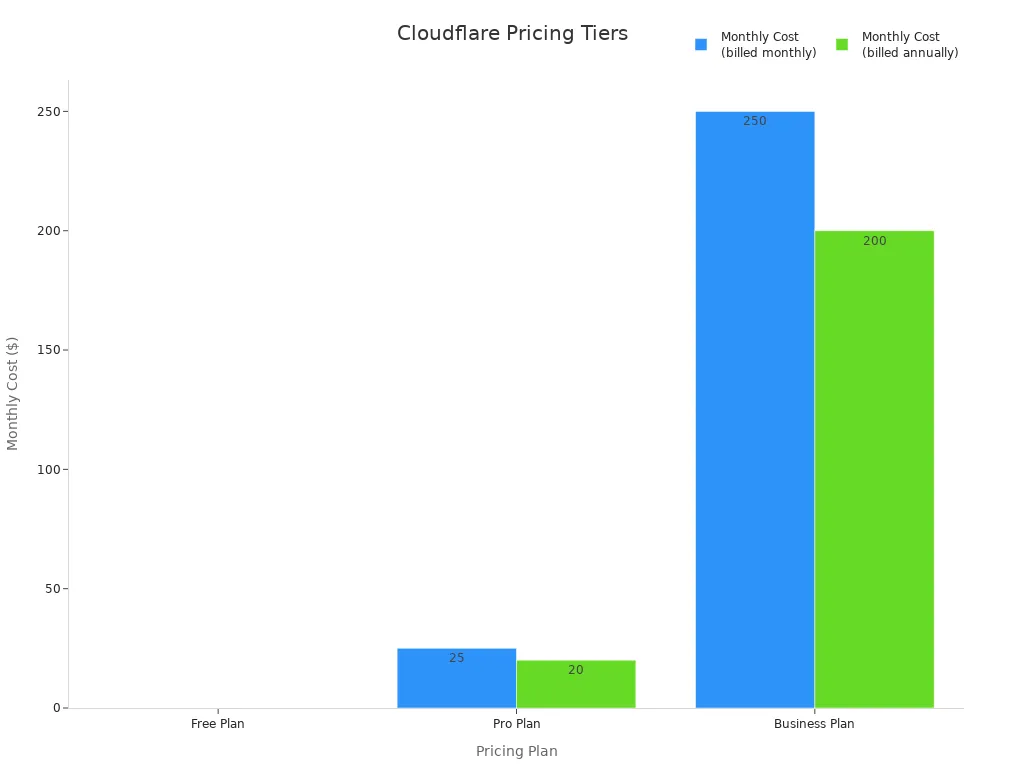
Cloudflare also offers an Enterprise plan. This plan provides comprehensive solutions with advanced features and personalized support for larger organizations. It handles high volumes of dynamic content and offers extensive ddos protection. You also get detailed real-time analytics for your content delivery speeds.
3 CDN Comparison: Bunny CDN vs Cloudflare

You need to understand the differences between Bunny CDN and Cloudflare. This helps you choose the best content delivery network for your website. Both offer great features, but they excel in different areas for your website.
Performance Showdown
When you look at raw speed, Bunny CDN often provides a slight edge for static content delivery. It focuses heavily on performance optimization. Cloudflare also delivers excellent speed, especially with its Automatic Platform Optimization (APO) for dynamic content. However, Bunny CDN's routing can sometimes be better. This means your content reaches users faster.
Security Features
Cloudflare is well-known for its robust website security. It offers extensive ddos protection, even on its free plan. This shields your website from many online threats. Bunny CDN also provides ddos protection and other security features. However, Cloudflare's ddos protection suite is more comprehensive, especially for advanced ddos protection. You get real-time analytics to monitor security events and ddos protection effectiveness.
Caching
Caching is crucial for speed. Bunny CDN offers easier cache control and faster purge times in some scenarios. You can configure it for full-page caching, even for Ghost blogs. This significantly reduces your Time to First Byte. Bunny CDN allows caching for logged-out users while member features still work. You can set a 3-day cache expiration and vary the cache by cookie values. Cloudflare, however, boasts instant purge times.
CDN | |
|---|---|
Cloudflare | 0 |
BunnyCDN | 20 |
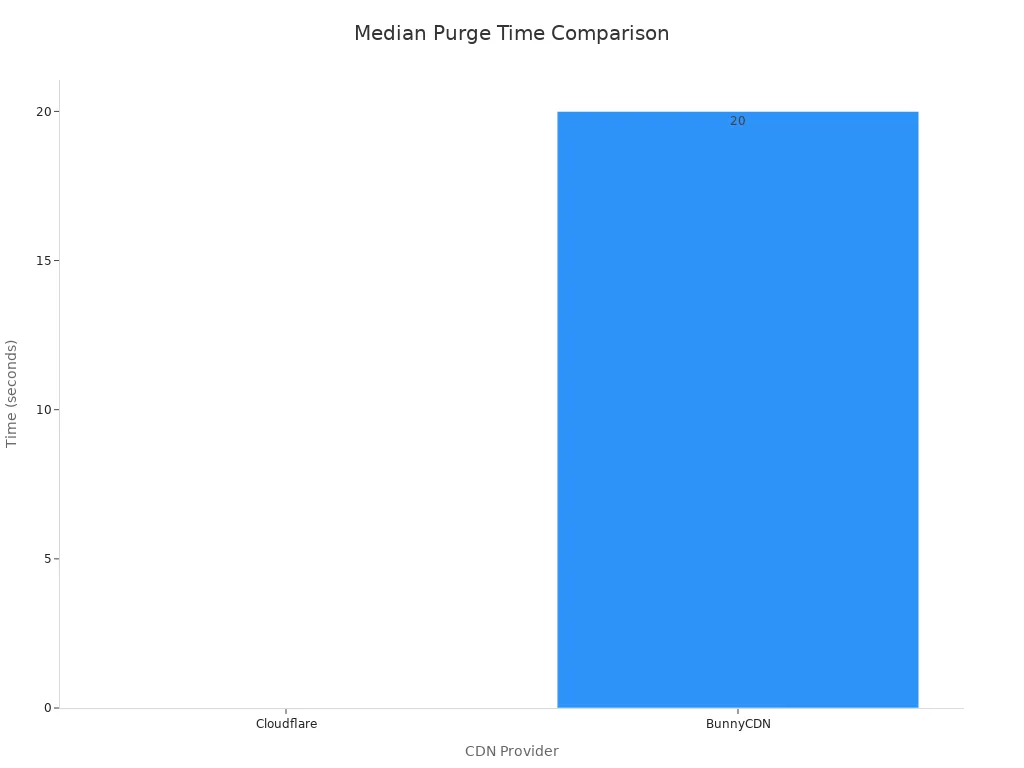
You can even use Cloudflare Workers to purge Bunny CDN's cache when your content changes. This ensures quick content delivery.
Setup and Management
Both CDNs offer straightforward setup. Bunny CDN integrates easily with WordPress using its plugin or a caching plugin. Cloudflare requires you to change your domain's nameservers. Its WordPress plugin helps manage settings. Cloudflare's interface can feel more complex due to its many features. Bunny CDN's dashboard is often seen as more user-friendly for basic content delivery tasks.
Cost-Effectiveness
The cost difference between Bunny CDN vs Cloudflare is significant. Bunny CDN uses a pay-as-you-go model. You pay a minimum of $1 per month. Data transfer starts as low as $0.01/GB. This makes it very affordable for small to medium websites. Cloudflare offers a free plan, but its paid plans (Pro at $20/month, Business at $200/month) are much higher.
BunnyCDN | Cloudflare | |
|---|---|---|
Pricing Model | Pay-as-you-go, minimum $1/month | Free plan, then tiered monthly subscriptions |
Data Transfer Cost | Starts at $0.01/GB | Not explicitly bandwidth-restricted for HTML content; paid plans have fixed monthly costs |
Tiers/Plans | Premium (global), Volume (high-bandwidth), Optimizer addon | Free, Pro ($20/month), Business ($200/month), Enterprise (custom pricing) |
Cost-effectiveness | Generally more affordable | Free plan is a teaser; paid plans are significantly higher |
For budget-conscious users, Bunny CDN is often the recommended choice. Cloudflare's paid plans suit enterprise customers needing extensive ddos protection and advanced real-time analytics. This ensures optimal content delivery.
4 Other CDN Contenders
While Bunny CDN and Cloudflare are popular choices, you have other strong options for your WordPress website. These best cdn providers offer unique advantages. They can significantly boost your website's performance and content delivery.
Key Features
Many other content delivery network options provide robust features. You can find solutions tailored to specific needs. Here are some key features from other prominent CDN providers:
Provider | Key Features for WordPress |
|---|---|
100% SLA Guarantee, effective for large file delivery, live streaming, and software distribution, advanced caching, easy WordPress integration, real-time analytics, DDoS protection. | |
Global network (50+ data centers), real-time image processing, seamless WordPress integration via plugins (Cache Enabler, CDN Enabler), developer-friendly (documentation, API support), free SSL certificates, DDoS protection, detailed analytics. | |
Extensive global network (50+ data centers), real-time analytics, versatile content support (video streaming, software distribution, large files), user-friendly control panel, SSL/TLS encryption, DDoS protection. | |
Real-time content delivery, edge computing capabilities, global network, versatile content support (live streaming, large files, dynamic content), real-time analytics, DDoS protection, TLS encryption, Web Application Firewall (WAF). | |
Global network (180+ PoPs), built-in DDoS protection, advanced caching and acceleration, SSL/TLS encryption, Web Application Firewall (WAF), user-friendly interface, comprehensive documentation, easy WordPress integration, real-time analytics, versatile content support. |
Unique Selling Points
These alternative CDN providers offer distinct benefits. They stand out from Bunny CDN and Cloudflare in various ways. You can choose a cdn that perfectly matches your website's requirements.
Provider | Unique Selling Points (compared to Bunny CDN/Cloudflare) |
|---|---|
Customer-centric platform with a significant cost advantage ($4 per TB) and 100% uptime SLAs. Offers flexible configurations like per-path rules, instant cache purges, and real-time analytics. Provides global reach with local support, including dedicated account managers and a 15-minute ticket SLA. Optimized for enterprise SaaS, media streaming, and high-traffic gaming. | |
Fastly | Developer-first performance with its Compute@Edge platform, allowing execution of micro-services at the edge using WebAssembly (Rust/JavaScript). Provides real-time logs for incident triage and is an early mover in HTTP/3 and QUIC support. |
Google Cloud CDN | Leverages Google's planetary-scale network with Anycast for minimizing time-to-serve static assets. Offers tight integration with Google Cloud services like Cloud Armor WAF and Cloud Run serverless. Provides flexible billing with committed-use discounts for cost savings. |
The world's oldest commercial CDN with massive global egress capacity (450 Tbps) and sub-50 ms latency to 95% of internet users. Offers granular controls through Kona Site Defender (WAF, bot management, API shielding) and advanced media acceleration for rebuffer-free streaming. Known for carrier-grade scale and reliability. | |
KeyCDN | Focuses on core performance with 100% SSD storage, advanced TCP stack, free Let's Encrypt SSL, real-time image processing, origin shield, and a RESTful API. Offers extremely competitive and transparent pricing with no request charges or hidden fees. Ideal for simple, fast content delivery without complexity. |
Specializes in high-volume use cases like video platforms and software distribution with massive network capacity (255+ Tbps), purpose-built video optimization (HD/4K streaming, multi-tier caching), S3-compatible storage with zero egress fees, and 24/7 engineer support. Owns all infrastructure for reliability and offers competitive pricing at scale. |
Use Cases
You can choose a cdn based on your specific needs. If you run a media-heavy website, CDN77 or CacheFly offer excellent video streaming and large file delivery. Developers often prefer Fastly for its edge computing and real-time logging. Google Cloud CDN integrates well if you already use Google Cloud services. For simple, fast content delivery without complex features, KeyCDN is a great choice. Akamai provides enterprise-grade scale and reliability for very large organizations. These best cdn providers ensure optimal content performance for your website.
5 Choosing Your CDN

Making the right choice for your cdn is important. It impacts your website performance and user experience. You need to consider your specific needs. This helps you speed up your website effectively.
Decision Factors
You should think about several things. Consider your budget first. Look at the type of content your website offers. Do you have many images or videos? How much traffic does your website get? Your technical skill level also matters for setup and management. Think about the level of security you need. These factors guide your decision for a content delivery network.
Bunny CDN Scenarios
Bunny CDN is great for specific situations. You should consider Bunny CDN if you:
Are a game developer needing fast patch and update
delivery.Are a blogger or small business with a slow-loading
website.Are a developer building web applications or media-heavy sites. This is especially true when you combine it with Bunny Storage for
contentdelivery.Prioritize
speedandperformance, especially if you use W3 Total Cache.Seek an easy-to-use and cost-effective
cdnsolution.
Bunny CDN offers excellent performance optimization for media-rich content.
Cloudflare Scenarios
Cloudflare suits many different website types. You might choose Cloudflare if you:
Need
speedand security for a wide range of web technologies. This includes HTML sites,wordpress, JavaScript SPAs, and mobile apps.Run an e-commerce
website.Cloudflareaccelerates and protects busy online stores. It caches unique product pages and generic templates.Own a small business.
Cloudflare's free tier offers enterprise-grade features without high costs. This helps you enhance your online presence.
Cloudflare works with almost any web-based system. You only need a DNS change to use its cdn. This makes Cloudflare a versatile choice. The bunny cdn vs cloudflare decision depends on your exact requirements.
For WordPress website speed in 2025, Bunny CDN generally offers a slight edge for raw content delivery. The bunny cdn vs cloudflare decision depends on your website needs. Bunny CDN excels in cost and performance optimization for static content. Cloudflare provides robust security and a free cdn tier for your website. Remember other best cdn providers also offer specialized content delivery for your website. Choose a cdn based on your budget, technical skill, and desired performance. This helps speed up your website and improves user experience. The content delivery network landscape continues to evolve, bringing new optimization for your content delivery. These best cdn providers constantly improve their cdn services.
FAQ
What is a CDN and why do I need one for my WordPress website?
A cdn (or content delivery network) stores copies of your website content on servers worldwide. When a visitor accesses your website, the cdn delivers content from the closest server. This significantly speeds up your website and improves user experience.
Can I use both Bunny CDN and Cloudflare together?
Yes, you can. You can use Cloudflare for DNS, security, and some caching, while Bunny CDN handles static content delivery. This setup can optimize your website performance further. It requires careful configuration for your content.
Which CDN is better for a small WordPress website on a budget?
Bunny CDN is often more cost-effective for smaller websites due to its pay-as-you-go pricing. Cloudflare offers a free plan, but its advanced features come with higher costs. Evaluate your specific content needs for your website's content.
How does a CDN improve my website's content delivery?
A cdn places your website content closer to your users. This reduces the physical distance data travels. It lowers latency and speeds up content delivery. Your website loads faster, providing a better experience for every website visitor.
What are the main differences in security between Bunny CDN and Cloudflare?
Cloudflare offers more comprehensive security features, including robust DDoS protection, even on its free plan. Bunny CDN provides good security, but Cloudflare's suite is generally more advanced. Consider your website's specific security needs for your content.